Total Call Control(Shake Call)
Waiting for an important call, but the touch screen on your device is unresponsive and there is no way to answer the call?
No problem, with the Total Call Control you have the aid of all the sensors and hardware keys available on your device.
Just shake it or push the volume rocker, camera button and you can pick up, hang up or start a new call.
Features:
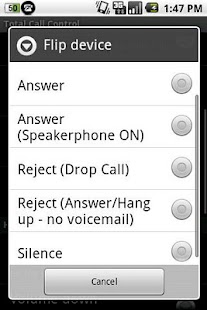
✔ Initiate outgoing calls (favorite number - fast dial via shake to call).
✔ Answer incoming calls with speaker on or off
✔ Reject/Block incoming calls, two modes to choose from: - drop or send to voice mail - answer/hang up - no voicemail
✔ Silence the ringer
Using the hardware keys and sensors available:
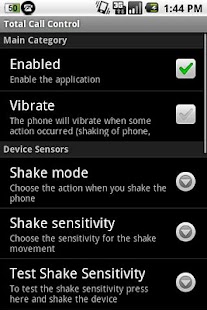
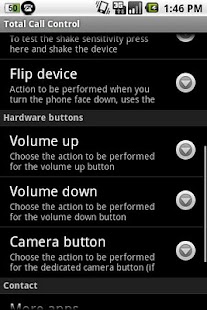
✔ Shake mode - shake your phone, 3 different user defined sensitivities
✔ Flip device - using the light sensor.
Will not trigger inside a bag or pocket, you have to pull it out first (not available on all devices)
✔ Volume up rocker
✔ Volume down rocker
✔ Camera hardware button (not available on all devices)
The shake feature is available on devices with accelerometer only (almost all android devices).
The face down (upside down) feature will require a light sensor.
Camera button requires a physical camera button on the device.
Contact us if you have any questions or suggestions.
Check out our other apps via the more by developer button.
Thank you!
About Total Call Control(Shake Call)
- Package name (App ID)
- com.incorporateapps.shake
- Available on
- Google Play
- Price
- Free
- Developer
- Megapps Ventures Inc.
Looking for the Total Call Control(Shake Call) APK?
The safest way to get Total Call Control(Shake Call) (com.incorporateapps.shake) on your Android device is to install it directly from Google Play — you'll always get the latest official version, automatic updates, and no risk of modified or infected APK files from third-party sites.
Camera Features
Advanced camera features with editing capabilities.
Food & Dining
Discover recipes and order food from your favorite restaurants.
Smart Home
Control and monitor your home with smart features.
See Total Call Control(Shake Call) in Action
Frequently Asked Questions
Is Total Call Control(Shake Call) free?
Yes, Total Call Control(Shake Call) is free to download and install on Android through Google Play.
How do I install Total Call Control(Shake Call) on Android?
Open Google Play on your Android phone or tablet, search for Total Call Control(Shake Call) by Megapps Ventures Inc. or tap the Google Play button on this page, then tap Install. The app downloads and installs automatically.
What is com.incorporateapps.shake?
com.incorporateapps.shake is the App ID (package name) of Total Call Control(Shake Call) on Google Play. Every Android app has a unique package name, and it is the safest way to verify you are installing the official app.
Is Total Call Control(Shake Call) safe to download?
Installing Total Call Control(Shake Call) from Google Play is the safest option: you get the official version published by Megapps Ventures Inc., verified by Google Play Protect, with automatic updates. Avoid APK files from unofficial third-party sites.
Get Total Call Control(Shake Call) Today
Total Call Control(Shake Call) for Android — free download on Google Play.
Compatible with Android phones and tablets — available on Google Play.
Ask AI about this app
Get instant answers about features, tips and more from popular AI assistants.